We've built both. Here's the honest breakdown of when each is the right call — and when you'll regret the choice you made in the proposal stage.
Most comparisons of n8n vs. custom code are written by people who haven't shipped either at production scale for a paying client. They benchmark features, count integrations, screenshot demos.
This one is different. We built a complex multi-workflow AI automation system in n8n for a real client, hit every wall the platform has, and came out the other side with a clear decision model we now apply to every new project.
This isn't anti-n8n. It's an honest map of where the tool works and where it breaks — written by engineers who've paid the cost of getting that decision wrong.
The Question Nobody Asks in the Proposal Stage
When a client says "we want n8n," the conversation almost always stops there. They have a subscription. They saw a demo. Their previous agency used it.
The question that actually matters is: what kind of automation is this?
That single question determines whether n8n makes your project faster or slower, cheaper or more expensive, and whether the client ends up with a system they can manage or one they're permanently dependent on you to run.
Use n8n When All of These Are True
1. The workflow is linear and short
Fewer than 15–20 steps. No branching that branches again. The happy path looks like: trigger → transform → call API → output. If you can draw the whole thing on a napkin, n8n is fine.
2. No loops required
This is the single biggest n8n limitation in production. The platform has no native iteration. If your workflow needs to generate 15 variants of anything, process a list of items, or retry a failed step — you're building workarounds immediately. In Python, that's a for loop. In n8n, that's Split In Batches nodes, manual routing, and visual spaghetti that doubles in size every time a requirement changes.
If the brief contains the words "for each," "multiple," or "per campaign" — that's a loop. Use code.
3. Error handling can be coarse
n8n's error recovery is workflow-level. If step 17 of a 20-step workflow fails, your options are: restart from the beginning, or build a parallel error branch that tries to resume from the right state. Both are painful. Neither is reliable under load.
If a partial failure is acceptable — "try, if it fails, notify me" — n8n works. If the system needs to recover gracefully from specific failure types with retry logic and backoff, build it in code.
4. No AI/ML orchestration
n8n calling OpenAI's API to generate a single piece of text: fine. n8n orchestrating a multi-step AI workflow where outputs feed into subsequent generation steps, with validation and regeneration on failure: not fine. The moment AI logic needs to be conditional, iterative, or stateful — you need code.
5. The client's team will actually maintain it
The "your team can maintain this visually" pitch works in demos. In production, the team never touches the workflows. They call you when something breaks. n8n didn't remove developer dependency — it just added a subscription fee on top of it.
If the client's team genuinely has technical people who will actively maintain the system, n8n is a reasonable choice. If "the team" means a marketing coordinator who last wrote HTML in 2019 — build it in code and give them an API with documentation. They'll have a better experience and call you less.
Use Code When Any of These Are True
- Loops or iteration anywhere in the flow
- More than 20 steps
- AI/ML models with conditional logic or multi-step generation
- Complex error handling and retry required
- Performance matters
- You need to test without burning API credits
- Multiple developers will work on it simultaneously
- Client will request features regularly (they will)
- Long-term maintainability is in scope
The honest version of this list: if you're building anything more complex than a webhook that does one thing and stops, use code.
What No-Code Actually Costs You
We built a production AI automation in n8n and spent 40% of development time fighting the platform rather than building the product. Here's what that looked like:
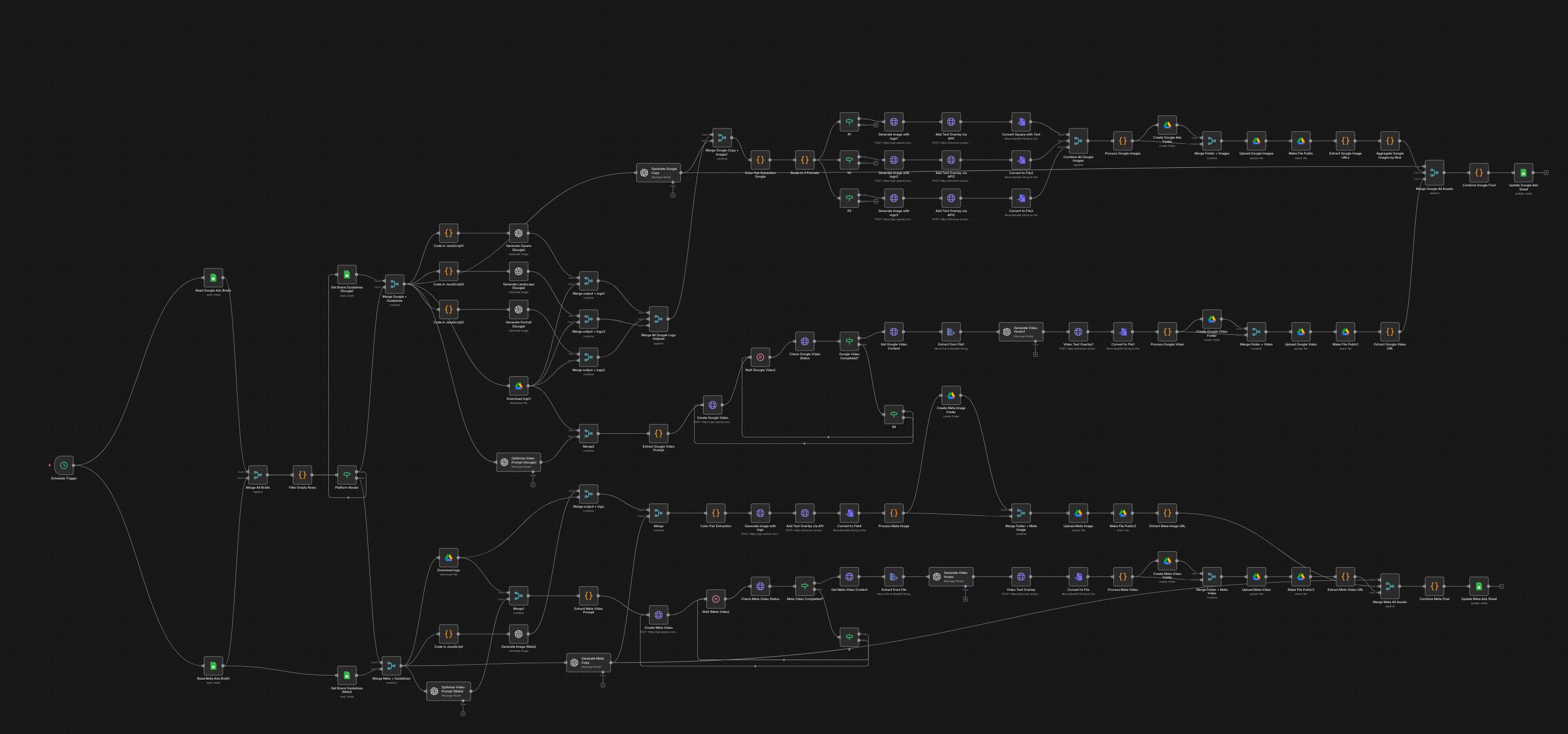
Loops that don't exist. Generating 15 ad headlines in n8n means 15 separate API calls manually routed through the visual editor. In Python, that's for i in range(15). The time difference on this single limitation across a 6-week project was significant.
Error handling that restarts from zero. When an API call fails partway through a complex workflow, n8n's Error Trigger restarts the entire execution. You're not recovering gracefully — you're burning API credits and hoping the retry completes cleanly.
JavaScript in every Function node. Every non-trivial data transformation required opening a code editor and writing JavaScript. The "no-code" promise lasted about two days.
A Python service alongside n8n. The workflow needed image text overlays. n8n can't do image manipulation. We built a Python FastAPI service to handle it. We were now maintaining two systems — the n8n visual workflows and a Python API — which defeated the original premise entirely.
The Reframe That Changes the Proposal Conversation
When a client pushes for n8n, this is the conversation that actually serves them:
"n8n will look simpler in the proposal. What it will actually do is cost more in development time, produce a system that's harder to debug and maintain, and add a monthly subscription that doesn't go away. Your team won't maintain the visual workflows either way — they'll still contact us for every change. What you actually want is a system that works reliably and doesn't require a developer to touch it for routine operations. That's better served by a clean codebase with an API and documentation than by a visual diagram with 200 nodes."
Most clients, when the trade-offs are explained clearly, will defer to your recommendation. Document the decision either way.
Where n8n Is Actually Good
To be fair: n8n is excellent for what it was designed for. Simple automation chains — a Stripe payment triggers a Slack notification and a row in Airtable — are genuinely fast to build and maintain. The visual interface is an asset when the workflow is short enough to see entirely on one screen.
The problem isn't n8n. It's using n8n for systems that have outgrown what visual workflow tools were built for. A 200-node n8n diagram isn't a visual workflow — it's code written in a format that makes it harder to work with.
The Checklist
Before recommending n8n on any new project:
- Does the workflow require loops? → Code
- More than 20 steps? → Code
- AI/ML logic with conditions or iteration? → Code
- Complex error handling needed? → Code
- Will you need to test without hitting live APIs? → Code
- Multiple devs working on it? → Code
- Client will request new features regularly? → Code
- Performance matters? → Code
If you reach the end without triggering a "Code" flag — n8n is a reasonable choice. That scenario is rarer than most proposals suggest.
Bottom Line
n8n is a good tool for simple automation. It is a poor tool for production AI systems.
Get the decision right in the proposal stage and the build goes cleanly. Get it wrong and you spend 40% of your project hours fighting a platform instead of solving the client's actual problem.
We know which one we'd rather be doing.