A production post-mortem on building complex AI automation in a visual workflow tool — and why we'll never do it again.
We don't usually write about tools we use on client projects. But after six weeks building a production AI automation system in n8n — and spending nearly half that time fighting the platform instead of building the product — we owe it to every technical founder and agency who's been sold the "no-code AI automation" dream to be direct about what actually happened.
This is a post-mortem. Names included, numbers real, nothing sanitised.
The Project
Client: A Sydney marketing agency.
Scope: Two automated AI workflows for generating ad creatives across Google Ads and Meta.
Workflow 1 — Performance Monitor: Runs daily at 2pm. Checks Google Ads campaign CTR against thresholds. When performance drops, automatically generates fresh creative — 15 headlines, 5 long headlines, 4 descriptions, 3 images, 1 video — and pushes everything to Google Sheets and Drive.
Workflow 2 — Custom Brief Generator: On-demand campaign generation. Client submits a brief in a Google Sheet, workflow processes hourly, outputs platform-specific copy, branded images with logo overlays, and video assets for both Google and Meta.
Stack: n8n cloud for orchestration, GPT-4 for copy, DALL-E for images, a custom Python FastAPI service for text overlays, Google Sheets API, Google Drive API, Google Ads API, Meta Marketing API.
Why n8n? Client's choice. They already had an n8n cloud subscription. They wanted a visual workflow builder their "non-technical team" could maintain. They believed it would be faster to build than code and wanted to avoid long-term developer dependency.
We didn't push back hard enough. That was our first mistake.
What the Numbers Actually Look Like
Six weeks in, here's how development time actually broke down:
- Building actual logic: 30%
- Fighting n8n limitations: 40%
- Debugging visual workflows: 20%
- Client scope changes: 10%
Four in ten hours spent fighting the platform. Not shipping features. Not debugging business logic. Fighting the tool.
Here's exactly what we hit.
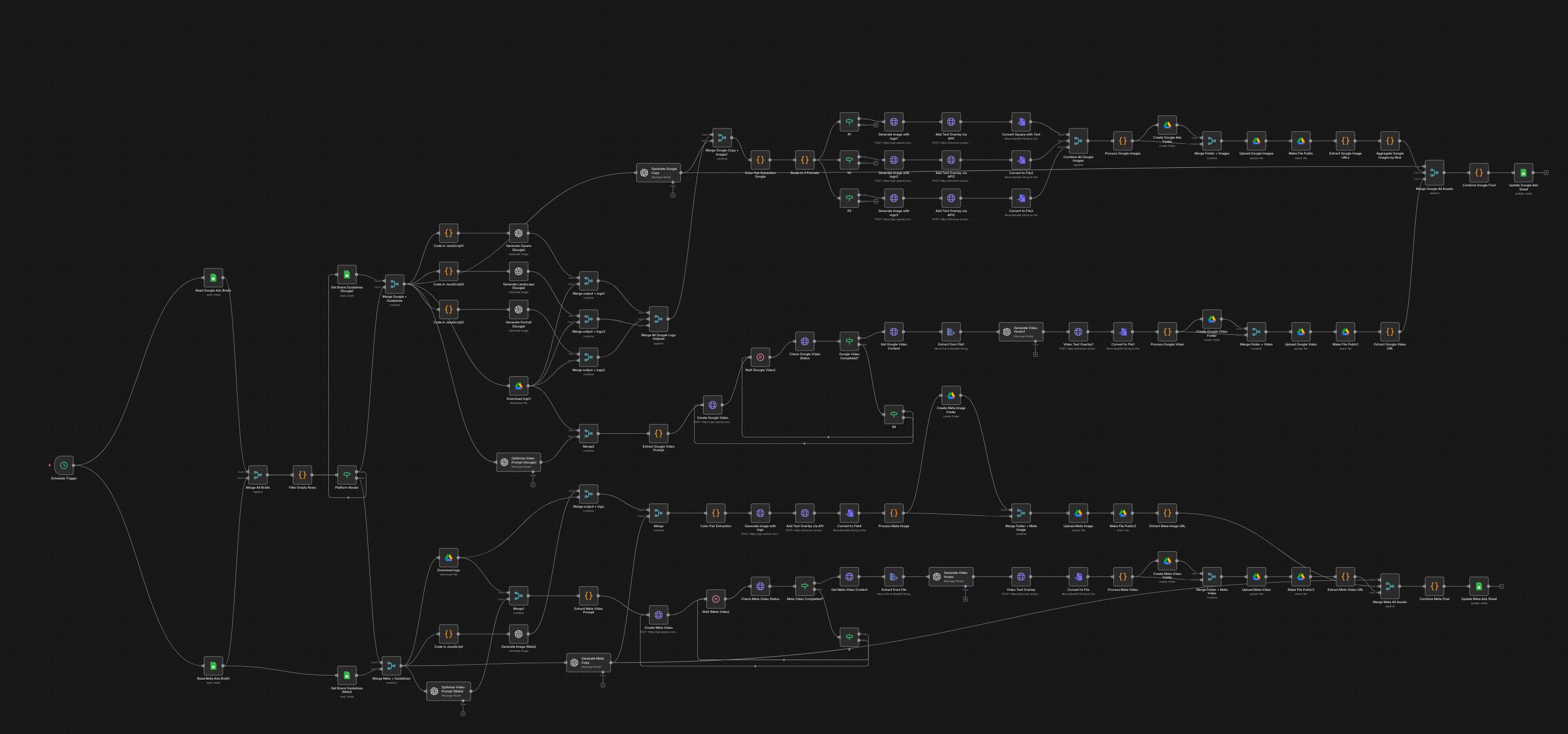
The Ten Ways n8n Failed This Project
1. There Are No Loops
This is the one that compounds everything else. n8n has no native iteration. You cannot loop over an array. You cannot write for i in range(20): generate_image(). What takes three lines of Python takes 50+ nodes in n8n.
Generating 15 headlines meant 15 separate API calls with manual routing between them. When the client later asked for 20 images per brief instead of 3, we didn't add two lines to a loop. We manually created 17 additional parallel branches — generate, compose logo, add text overlay, upload, get link — and connected them all by hand.
The visual diagram became unreadable. The workflow became unmaintainable. And none of this was a surprise once we hit it — it was a fundamental architectural limitation we couldn't route around.
2. Error Handling is Primitive to the Point of Useless
In production AI workflows, things fail. APIs timeout. Rate limits hit. Bad prompts return garbage. Graceful error handling isn't optional — it's the difference between a system that recovers and one that requires manual intervention at 2am.
n8n's equivalent of try-catch is an Error Trigger node that restarts the entire workflow from the beginning. Not from the failed step. From the beginning. When image generation fails halfway through a 50-step flow, you restart everything — burning API credits and time on steps that already completed successfully.
We couldn't implement exponential backoff on individual steps. We couldn't retry a specific API call. We ended up manually logging failures to a Google Sheet just to have some visibility into what was breaking and where. That logging system became more reliable than the platform's own error reporting.
3. You're Writing Code Anyway
The "no-code" promise collapsed within the first week.
Every data manipulation in n8n requires a Function node with custom JavaScript. Splitting a comma-separated string: write JS. Parsing a JSON array: write JS. Filtering and mapping data: write JS. Validating character limits for Meta headlines (40 chars) and Google headlines (30 chars): write JS with branching to regenerate if too long.
We wrote JavaScript in dozens of Function nodes throughout the workflow. We also built a separate Python FastAPI service because n8n cannot do image manipulation — so every image generation call went through our own API anyway.
We ended up maintaining two systems: an n8n visual workflow and a Python service. The "no-code" premise was dead before week three.
4. API Rate Limits With No Queue Management
n8n has no built-in rate limiting or queue management. Generating 20 images in parallel means 20 simultaneous DALL-E calls. Hit the rate limit and the workflow fails — not gracefully, not with a retry queue, just fails.
The workaround: manually inserting Wait nodes with calculated delays between API calls. We hand-calculated timing gaps and hardcoded them into the flow. When OpenAI's rate limits changed, we updated them manually. This is not engineering. This is plumbing with a ruler.
5. Conditional Logic Becomes Visual Spaghetti Immediately
A simple if/elif/else in Python is five lines. In n8n it's an IF node that creates two branches, each of which may need their own IF nodes, which create more branches. By the time you have three levels of conditional logic, the visual diagram is a tangle of lines crossing each other that no one can read at a glance.
We had to handle both a default composition style and custom client templates — two completely separate image generation paths. In code, that's a function that takes a template_type parameter. In n8n, it was two full parallel branches that had to be maintained separately every time something changed.
6. Version Control is Broken
n8n workflows export as JSON blobs. You can't meaningfully git diff a JSON blob when the change was moving a node three pixels to the right. Code review is impossible. Reverting to a previous version means manually exporting and importing JSON files. Collaboration means taking turns and hoping nobody saved over someone else's work.
We are a team that uses git for everything. On this project, version control was effectively non-existent for the core workflow logic.
7. Testing Means Burning API Credits
There is no local testing environment for n8n cloud that matches production. Every test run executes against live APIs — real OpenAI calls, real Google Ads API calls, real Meta API calls. Testing the full workflow costs money every single time.
We couldn't mock API responses. We couldn't unit test individual nodes. We couldn't run the workflow against fixtures. Every "does this work?" answer required a full live execution. Debugging a single step meant running the entire workflow from the start.
8. Debugging is Click-Through Hell
When something fails, you click through each node in sequence to inspect what data it received and what it output. There is no console. There are no stack traces worth reading. Error messages say "Node execution failed" with a timestamp. That's it.
Finding a bug in a 50-node workflow means opening every node manually, checking its input and output data, and reasoning backwards from the failure point. In code, that's a stack trace and a debugger. In n8n, that's 40 minutes of clicking.
9. Performance is Slow by Architecture
Each node adds overhead. A 50-node workflow has 50 points of latency. There's no way to optimise execution the way you can with code — no async/await, no parallel processing beyond the visual branching n8n provides, no control over execution order beyond what the visual editor exposes.
Our workflows were slow. Not unusably slow, but slower than the equivalent Python implementation would have been. For a daily automation that runs once at 2pm, this didn't matter. For anything latency-sensitive, it would.
10. Code Reusability is Zero
n8n has no concept of functions, modules, or shared logic. If the same transformation logic is needed in two places, you copy the nodes and maintain duplicates. When the logic changes, you update it in every place it exists — manually, by memory.
The DRY principle doesn't exist in n8n. Technical debt doesn't accumulate linearly — it compounds.
What We Should Have Built
A clean Python FastAPI backend:
FastAPI Backend:
├── main.py
├── workflows/
│   ├── performance_monitor.py
│   └── custom_brief.py
├── services/
│   ├── openai_service.py
│   ├── image_service.py
│   ├── composition_service.py
│   └── text_overlay_service.py
├── integrations/
│   ├── google_ads.py
│   ├── meta_ads.py
│   └── google_sheets.py
└── utils/
    ├── retry.py
    └── rate_limiter.py
Roughly 1,000 lines of clean, testable, version-controlled Python. Deployed on Railway or Render. Scheduled with Celery. The client gets an API and documentation — not a visual diagram they'll never open.
We built half of this anyway (the FastAPI text overlay service). We should have built all of it.
The Bottom Line
- What we promised: Visual workflows the client's team can maintain.
- What we delivered: Complex n8n workflows plus a Python service plus JavaScript in every Function node.
- What we should have built: A clean Python codebase.
- Time wasted fighting n8n: approximately 40 hours.
- Client team members who've touched the n8n editor: 0.
- Would we use n8n for this type of project again: No.
The platform that looks simplest in a demo is not the platform that's simplest to build in, maintain in, or debug in production. For complex AI workflows, no-code isn't a shortcut. It's a detour.